
Network Cabling in San Francisco CA – Installed, Tested & Certified
We install commercial network cabling in San Francisco CA: Cat6 and Cat6A data cabling, Ethernet drops, patch panels and PoE-ready runs for offices, warehouses, schools and medical facilities, with every link tested and certified before handoff.
Whether you need twelve new drops for a conference room or six hundred for a full-floor buildout, our C-7 licensed technicians pull the cable, terminate it to jacks and panels, label both ends and hand your IT team a certification report for every run.
Adding drops, moving offices or replacing old Cat5e? Get an itemized network cabling quote — call (628) 215-7235.
Request a quoteNetwork Cabling Services
Every network cabling project starts with installation and ends with certification. Choose the service that matches your project, or call us and we’ll scope the right mix.
Network Cabling Installation
New horizontal cabling, moves, adds and changes, pulled from the telecom room to every workstation, access point and device.
-
Data Cabling Installation
Copper data drops for workstations, printers, phones and AV, terminated to keystone jacks and patch panels.
-
Ethernet Cabling Installation
Ethernet runs for 1G, 2.5G, 5G and 10GBASE-T networks, including PoE for cameras, access points and VoIP phones.
-
Cat6 Cabling Installation
250 MHz Cat6 cabling for gigabit workstations and standard office drops at a lower cost per run.
-
Cat6A Cabling Installation
500 MHz Cat6A cabling for 10 Gbps to 100 meters, Wi-Fi 6E and Wi-Fi 7 access points and high-wattage PoE.
-
Network Cabling Testing & Certification
Permanent link testing to TIA-568.2-D with exported reports that qualify for manufacturer warranties.
How We Install and Configure Network Infrastructure Cabling
Each run starts in the MDF or IDF, where we mount patch panels and horizontal cable managers in the rack. From there we pull cable through J-hooks, cable tray or conduit, keeping at least 12 inches from fluorescent fixtures and electrical feeders and holding a bend radius of four times the cable diameter.
At the workstation end, we’re installing low-voltage mounting brackets, surface raceway or floor boxes, then terminating each cable to a T568B keystone jack. Back in the rack, every port is punched down, dressed with Velcro, labeled to TIA-606 and connected to the switch with color-coded patch cords.
For PoE devices, we size the cable to the load: Cat6A handles 802.3bt Type 4 power for Wi-Fi 7 access points and PTZ cameras with less heat rise in large bundles, while Cat6 is a cost-effective fit for desk phones and workstations.
Where We Run Commercial Cabling, From Offices to Data Center Rooms
- Open-plan offices and workstations
- Conference and huddle rooms
- Wireless access point locations
- IP camera and access control points
- Warehouse and distribution floors
- Classrooms and school IDFs
- Medical exam rooms and nurse stations
- Retail POS and back-office areas
- Server rooms, data center racks and telecom closets
Recent network cabling work by neighborhood
Jackson Square historic offices
Fishing Cat6 through the brick walls and timber ceilings of 1850s-era buildings for architecture and law firms, using surface raceway where the landmark rules limit open walls.
Dogpatch light industrial
Cat6A runs to rugged enclosures for makers and fabrication shops along 3rd Street, with cable in conduit to protect it from forklifts and machinery.
Yerba Buena hotels near Moscone
Overnight upgrades of guest-floor and ballroom drops for hotels serving convention traffic, scheduled around room blocks and events.
Embarcadero pier offices
Network cabling for offices inside converted waterfront piers, routed along steel trusses where there’s no drop ceiling to hide cable.
Cat5e vs Cat6 vs Cat6A: Network Cable Specifications
The cable you choose decides how fast your network can run and how much PoE it can carry. For most new San Francisco office buildouts, we recommend Cat6A to the access points and Cat6 or Cat6A to the desk.
| Category | Bandwidth | Max speed | 10 Gbps distance | Best for |
|---|---|---|---|---|
| Cat5e | 100 MHz | 1 Gbps (2.5G with NBASE-T) | Not supported | Existing cabling only; not recommended for new installs |
| Cat6 | 250 MHz | 10 Gbps | Up to 55 m | Workstations, VoIP phones, printers |
| Cat6A | 500 MHz | 10 Gbps | Full 100 m channel | Wi-Fi 6E/7 APs, PoE++ devices, future-proof drops |
| Cat6A shielded (F/UTP) | 500 MHz | 10 Gbps | Full 100 m channel | High-EMI areas: labs, medical imaging, industrial |
Network Cabling Testing & Certification
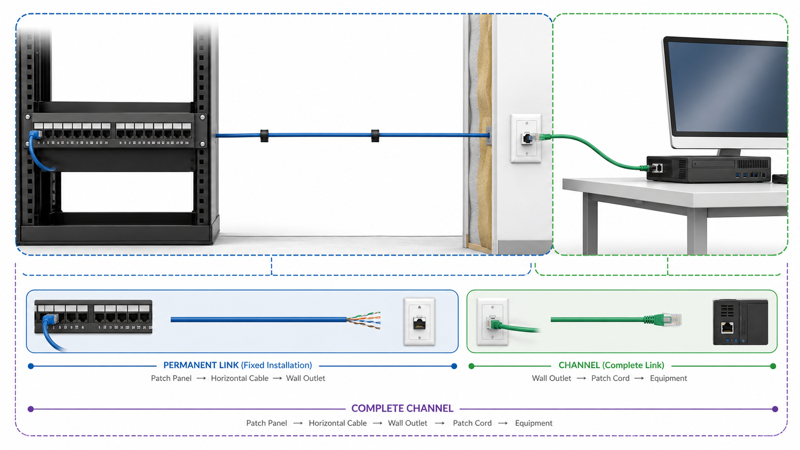
Every copper link is certified against TIA-568.2-D permanent link limits, measuring wire map, length, insertion loss, NEXT and return loss on all four pairs. Failing links are reterminated and retested before we leave, and you get exported PDF reports organized by telecom room and panel. Learn about our testing and certification.
Network Cabling Service Area
We install network cabling in every neighborhood in the city, plus these nearby cities:
- Daly City, CA
- Tiburon, CA
- Alameda, CA
- Oakland, CA
- South San Francisco, CA
- San Bruno, CA
- Albany, CA
- Berkeley, CA
- Piedmont, CA
- Mill Valley, CA
See every location on our service area page.
Request a Quote From Our Network Cabling Company
Send a floor plan or drop count, and we’ll schedule a site walk and return an itemized quote, usually within two business days.
San Francisco Telecom TechsOne Beach St, San Francisco, CA 94133
Phone: (628) 215-7235
Email: [email protected]
Get your network cabling installed, labeled and certified on schedule.
Request a quote